Over the years I’ve seen conversion tracking with Google move from simple last click cookie attribution to a myriad of different options and features, and attribution methods.
Here’s a short list of what you need to consider these days:
- Native, GA4, Google Tag Manager, or 3rd party implementation
- Yes or no to Server-side tracking
- How to implement Enhanced Conversions for leads or web
- Whether to use an attribution model other than data-driven
- How long to set the click-through and view-through attribution windows
- Which Google Ads conversion goals should be primary or secondary, account-level default or not
- Count one or all conversions
- What default values to use assuming you want to use value-based bidding
- Which conversions to include if using campaign level conversion tracking
- Whether to include value rules or prioritize certain user segments such as new or existing customers
- Whether to apply specific or all conversions to specific campaigns
- And on and on ad nauseam
And now, we have something entirely new to think about. Google has rolled out their Google Tag Gateway tool. Okay, so what the heck is this, what does it do, and will it help campaign performance at all? Or put another way…
What Problem Does Google Tag Gateway Solve?
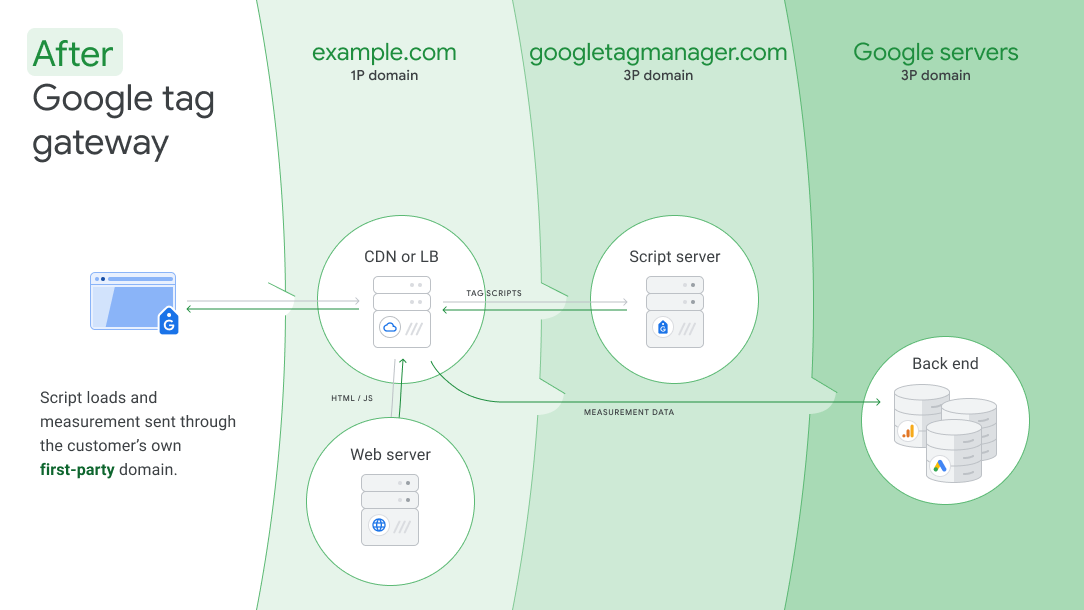
Ad Blockers and browsers like Safari include functionality that detect Google javascript tags and prevents them from running. This means you won’t be able to track website visitors or conversions through Google Analytics or other Google Tags. Restoring the ability to track these users/conversions can boost the number and accuracy of conversions tracked.
Thus, you will be able to better assess what value Google Ads and other channels are driving. And, by capturing more conversions, ad campaigns will naturally start to perform better.
Of course, you can resolve these issues by using full blown server-based tracking. But setting that up is complicated, will usually require maintenance from time to time, and you’ll need to pay for hosting.
How Does Google Tag Gateway Work?
There are several ways to configure Google Tag Gateway, but the most common would be through a plug-and-play integration with Cloudflare. If you’re already using Cloudflare (even the free version) and Google Tag Manager you can configure the setup in a few moments.
Here’s a great setup video from “Loves Data” that walks through the configuration.
Once configured your Google Tags will appear to ad blockers and browsers as random javascripts that run from your website. Hence, the scripts will be allowed to run.
How Many More Conversions Will You See?
That’s really hard to know. First, if you’re using server-side tracking you won’t benefit at all from Google Tag Gateway. Likewise, if you’re using 3rd party tracking, it’s unlikely you’ll see a boost in tracked conversions from the tool. Also, enhanced tracking can play a role as that already restores tracking for users that have a Google profile.
Advertisers that aren’t using any of those tracking methods will probably benefit the most. As I said earlier, almost 33% of users run an ad blocker. But not all ad blockers offer Google javascript blocking and users often turn off ad blocking for many websites. On the other hand, some ad blockers still manage to block javascripts, even when Google Tag Gateway is installed. I’d say a fair estimate for this scenario would be to capture an additional 10-20% of Google Ads conversions.
That may not sound like much, but it can impact campaigns in several ways. First, by revealing more accurate/higher conversion figures, advertisers are more likely to increase their investment. Also, having more conversion data can boost your optimization performance. And lastly, automated bidding and ad rotations can self-optimize faster and better.
Summary
In simple terms, Google Tag Gateway is a free tool that can help advertisers boost conversion tracking accuracy for Google Analytics and Google Ads. Advertisers that use standard tracking methods will almost certainly benefit while those using server-side tracking won’t see any improvement at all.
The tool is really easy to install for existing Google Tag Manager & CDN (content delivery network) users, especially if they are on Cloudflare specifically.
As an ad agency owner, I recommend Google Tag Gateway to any advertiser that isn’t currently running server-side tracking. It’s a no-brainer that’ll boost performance and provide much more robust conversion reporting. Here’s a short video explanation.