Including or excluding your price in Google Ads can honestly make or break your campaign. The cost of your product or service is top of mind for every visitor. And stating it pre-click has it’s benefits and drawbacks. In this article I’ll run through some scenarios where including or excluding your pricing probably makes the most sense.

But as always, you absolutely need to A/B test pricing in your ads!
Where Can You Display Your Price?
Shopping Ads
First, let’s get shopping ads out of the way. Whether you’re running Standard Shopping or Performance-Max, your ads must display the price. With little choice in the matter there are a few things you can do to boost performance. First, if you markdown an item it’ll be displayed with the discounted price and a strike-through over the original price.
Everybody loves a deal and fears missing out on one. Thus, as you might expect you can boost both click-through rates (CTRs) and conversion rates (CVRs) with that little trick. Second, you can offer a promotion through Merchant Center where an additional dollar amount or percentage is taken off at check-out. This can be integrated with or without a discount code and there are a few more exotic options as well such as discounts on buying minimum quantities.
Search Ads
You can incorporate your price directly into headlines and descriptions. If indicating price is paramount you should consider pinning that piece of creative. Always ensure you use qualifiers, such as “from” or “starting at” or “per month” or “per dozen” to ensure pricing is perfectly clear prior to the click. Ideally, when including pricing in a headline, don’t waste your space. Try to incorporate a feature or benefit with the price. For example you might use “$49/Month, We Deliver Free.” Alternatively, you might generate fear of missing out with “Just $249, Price Goes Up June 1st.”
One last thing to remember is that you should state the currency if you’re offering your products and services to another country. For example, if you’re advertising to Canada and sell in US dollars you should state “US$29/hour” for example. You can, of course, assume that Canadians will already guess they’d pay in USD. But those that don’t might bounce once they find out the cost is some 35-40% more than they originally thought.
Price Assets (Formerly Extensions)
Price assets will periodically display the price below your main ad text along with other assets. As with all assets, Google will serve the price asset whenever it feels it has a good chance to help generate a click. In many years of experience I’ve found that price assets don’t tend to get a lot of action. But clearly they do serve sometimes. If you’ve already found that including your price in ad copy boosts campaign performance it’s a no-brainer to double down with this asset.
Price assets require a brand header and description using preset categories along with a URL. In addition you must include the price, qualifier (from, up to, or average), and optional item unit, e.g. per week. For full details see this support article about price assets from Google.
Sitelinks and Callouts
You can add pricing information here as text. If you really want to shout your prices from the rooftop you might consider adding them in these assets. But generally if you’re already pinned it in a headline or description plus added price assets you’re well covered – this would be overkill. Thus I generally don’t recommend this strategy.
One other thing to consider here, creating a sitelink for your pricing page, but not actually including your prices in sitelink text.
Overlay in Images and Videos
You can add pricing as an overlay in images for display, Demand Gen, or P-Max campaigns. I would use this sparingly, don’t let text overlays overwhelm the images as they are already displayed inline with other responsive assets including headlines and descriptions. The same is true for videos, where I would consider displaying the price at the start and/or at the end of but not throughout the entire video as that may be too distracting from the messaging.
Video Content
Lastly, you can obviously display and/or state the price verbally if you have actors or voiceovers directly in the video.
When Displaying The Price Will Typically Benefit Performance
You are the bargain brand
If you sell based mainly on having the lowest price you should almost always display the pricing in your ads and applicable assets. This will yield several benefits:
- You will see higher CTRs as your price point will be attractive to most users
- As a result of (1) you should enjoy lower CPCs, which will yield a lower CPA (cost per action) or higher ROAS (return on ad spend)
- As a result of (1) you will be able to enjoy higher impression share and thus can be more targeted with your keyword strategy
There is a potential downside of course, and that is that people that initially click through may lose interest when they see that you lack features and benefits of some more expensive options. But this is unlikely if the low price is mainly what attracted them to your ad in the first place.
You offer more for less than the big brand
If you offer more utility, benefits or features than the entrenched brand at a lower price point it can pay off to display your pricing in ads. The same benefits apply here as above. Of course you might not be as competitive with some of the smaller brands but often that’s not your primary competition in a “Kleenex” scenario where 90% of sales go through one major player.
You are the established luxury brand
When you are entrenched as the luxury brand you usually do benefit from including your pricing info. While this may not lead to an increase in CTR or lower CPCs it will help prequalify visitors. Those that find your pricing affordable are more likely to click than pass up on clicking assuming the price is out of reach. And, on the other hand, users that can’t afford your price won’t click which will save you from getting unqualified clicks that won’t convert. In effect, this will increase your conversion rate.
However, with the potentially reduced CTR you might not offset that with better conversion rate.
You offer a freemium pricing model
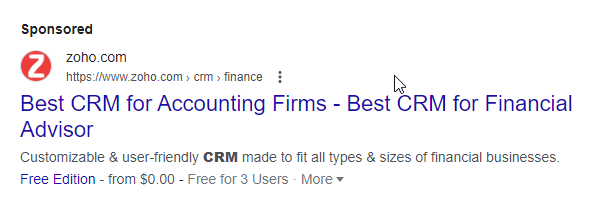
If you offer a minimally viable version of your product completely for free, you should absolutely make that clear in your creatives. It’s almost certainly going to boost KPI performance across the board.
When Displaying The Price Will Typically Lower Performance
You sell based on being a more robust solution at a higher price point
If you’re not a well established brand but sell a better product, I would advise against including your price in ads. It will prevent many potential customers from clicking through to learn about your features and benefits before deciding whether you’re worth it. You might even not display the price on your website or landing page in this case, although that is a bit extreme.
A good example of this would be if you sell a premium service that somebody can DIY for free. Establishing the clear benefits of working with you vs. DIY before stating the price is paramount to getting a decent CTR on your ads. Putting the price in your ads can absolutely kill your CTR in this case, leading to huge CPCs, low quality scores, and not even entering many keyword auctions.
Another example is that you are more expensive than your competitors, but there are great reasons for that. For example, if you offer a SaaS perhaps you cut work effort in half compared to the other guys. But it may not be easy to explain this benefit quickly in your ads… prospects need to read through the landing page before understanding how your product, while expensive, will actually save them money.
You haven’t established a market need for your product or service
If you have a novel offer and are building a new category you probably should stay clear of stating your pricing in ads. Until people understand the problem you’re solving you shouldn’t tell them how much it’s going to cost. In fact, it may even be best that you don’t hit them with the price until you’ve been able to perform a demo or consult call, assuming that makes sense for your product.
You’ve recently increased pricing
This is a tough one. Sometimes businesses need to raise their prices. If this is noticeable to your target audience they are certainly going to convert less on your website. I would avoid confounding the problem by putting pricing in your ads right after this change. Give it a good couple of months before considering stating your price up front again.
Other Pricing Considerations
Including a special discount or sale in conjunction with your original price can dramatically improve campaign performance. And this strategy can be even more effective when it’s a limited time offer. There are so many different ways to offer a sale price that I won’t go over them here. But suffice to say, the bigger the deal, the better your performance.
You can, also, just say there’s a discount without disclosing the regular price… but that makes things esoteric so be thoughtful and test carefully if you plan to do this.
Just be sure to keep it real. Don’t pretend you normally sell your product for $999 but today only it’s just $49… people figuratively and quite literally aren’t going to buy it, nor should they!
How Can You A/B Test Pricing In Ads?
In the case of Responsive Search Ads, you can use ad variations to test priced vs. unpriced headlines and descriptions. Typically this would look something like “World’s Lightest Bike” vs. “World’s Lightest Bike – $3,599.” For text on image overlays you can easily test a plain image against the one with pricing, or if there’s additional ad copy do just like the example for the RSA I provided.
It’s a bit more tricky with assets (extensions) as you cannot directly test with or without specific ones. In the case of callouts and sitelinks you can look at the KPIs for those that contain pricing and compare that to your overall average. This will give you a strong indication whether pricing is causing higher or lower CTRs and CVRs.
Price assets can be tested a few ways. First, you can compare performance when price assets run to when they don’t run, i.e. baseline. This is very error-prone, however, because price assets tend to run when ads are in higher ad positions, given those ads an advantage. Another, also not great option, is to compare overall performance when they are on vs. off. The problem here is that the market conditions and campaign performance are never static. Other things may influence the “test” results. Bottom line, you’ll need to use a bit of dead reckoning unless the performance difference is obvious.
Summary
This article is intended as a rough guide to when displaying prices in your ads will benefit performance or do the opposite. Every situation is unique so you should always consider split testing this element of your creatives. Importantly, whether or not you include your price in Google Ads can have a very substantial impact on campaign performance and needs to be part of your overall creative strategy.