Ever since the launch of Performance-Max campaigns back in 2021 advertisers and agencies have been crying out for more transparency and control. And bit by bit Google has been granting that wish, “Unlocking P-Max.”
Some Previously Rolled Out P-Max Features
- they have slowly streamlined the process for requesting keyword and placement exclusions
- created a tool for brand exclusions
- included conversions reporting for specific creative assets
- provided asset group level reporting
- added some general keyword theme reporting
But none of these changes are as significant as the current range of beta and fully released features we’re getting right now. In this article I’ll briefly discuss each of the new features and the benefits they offer. I will also be writing specific articles for each of the major new features… some are already published with more to follow, so stay tuned for those.
So what’s going on exactly? Is Google finally listening to advertisers? Are they trying to placate the DOJ? Do they believe advertisers will invest more if they have better control and transparency? Whether it’s one thing, all of the above, or something else, I’m just happy for the sea change.
Negative Keywords Interface
Google has been promising this for what seems like eons. Most advertisers now have this feature which facilitates adding negative keywords directly to individual P-Max campaigns. Because the previous method, uploading a spreadsheet of negatives to support, required so much effort, advertisers are much more likely to properly maintain negatives moving forward.
Keep in mind that these negative keywords apply only to search and shopping networks. If you want to apply negatives to content, you will still have to use the account level negative keywords list or excluded content keywords tools. Also, you cannot apply negative keyword lists to P-Max, at least not yet. So if you want to add these you’ll need to download the list into a spreadsheet and then copy/paste individual keywords into the interface.
P-Max Search Terms Report
The perfect pairing for the negative keywords interface is the new (in closed beta but confirmed for full release) search terms report. As with search and standard shopping campaigns, the report offers a full complement of KPIs and tools to filter and sort to facilitate finding queries to add to search campaigns or exclude from P-Max.
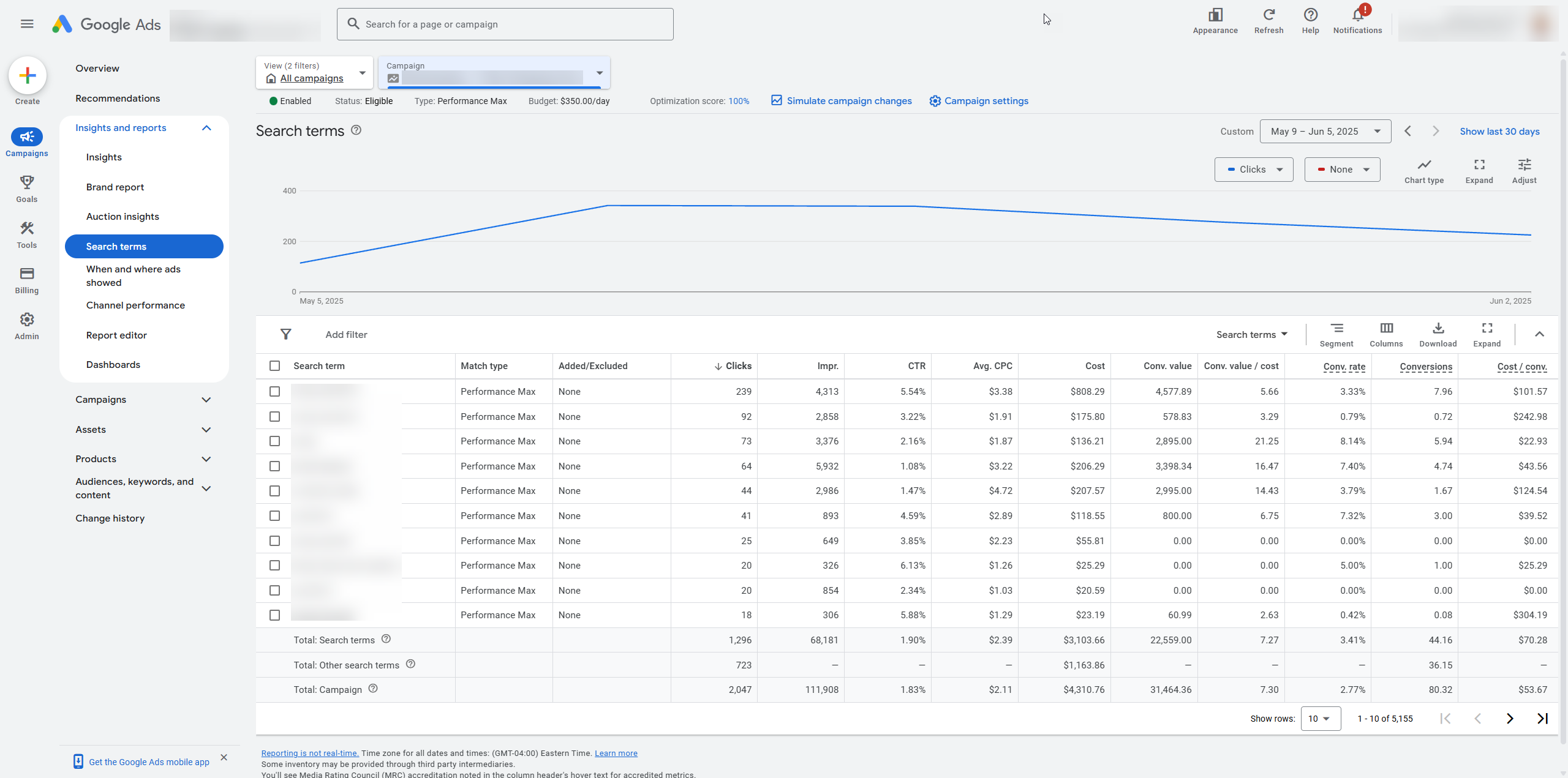
This is practically a dream for agencies as there is so much P-Max garbage to kick to the curb. Add to that the ability to directly migrate specific queries as keywords back to search and this is really living! To me this is the most significant campaign feature Google has rolled out for P-Max.
Brand Exclusions by Channel
Brand exclusions by channel (in closed beta) allows advertisers to choose to selectively exclude or allow brand list targeting/exclusions for search and/or shopping. This sounds like a small thing but addresses a specific use case that applies to many online shops. When a shop runs a dedicated branded search campaign a corresponding move is to block the brand across all other campaigns. But if you do that in P-Max you’ll going to kill high value branded shopping ads. Thus if you sell widgets, users will no longer see your product ads for “your brand widgets” which is less than ideal to put it mildly.
The current work around for this is to create a “naked” P-Max campaign that targets branded. Not great.
Now with the channel exclusions it’s a simple matter to block search but not shopping. I’ve made a short video about the new feature.
P-Max Channel Reporting
While some scripts like the one from Mike Rhodes provides channel (search, shopping, display) reporting, there is no facility in the online interface. That is until now. Google has launched (in closed beta but announced for full release) full channel reporting for P-Max. And, unlike, Mike’s script Google goes one step further and breaks out discovery and gmail as a separate channels from display. And they offer a nice waterfall visual that makes it easy to understand the data.
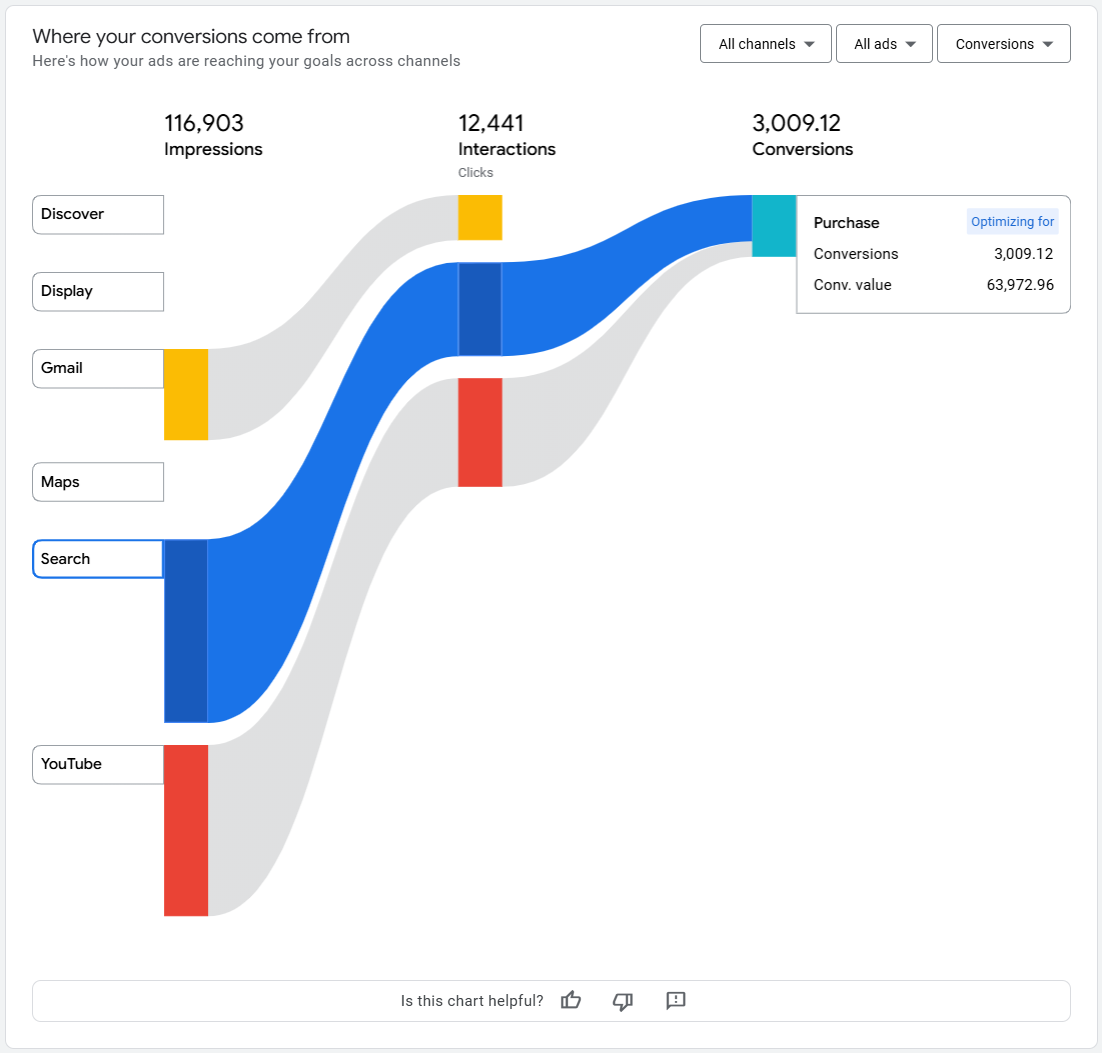
Now, it’s important to remember that we do not have any direct control over spending per channel. But at least this will help us understand how Google is spending the budget and whether an upturn or downturn in performance can be attributed to a channel mix change.
For example, if we see a big uptick in display interactions (clicks) and a drop in conversions we can start to look at culling placements that may be of questionable quality.
User Age Exclusions
Up until this little beauty (now available for all advertisers) we could selectively choose which demographics to target in audience signals. But Google wouldn’t necessarily adhere to those targets and could end up doing exactly the opposite. With age exclusions, available in campaign settings, we can now definitive cut wasted ad spend for groups that won’t ever buy specific services. For example, do you run a geriatric medical practice? It might be okay to run search ads to all ages, i.e. some children will be looking for a doctor on behalf of their parents or grandparents. But over in P-Max it’s probably a bad idea to run display, discovery, and video ads to 18-64 year olds.
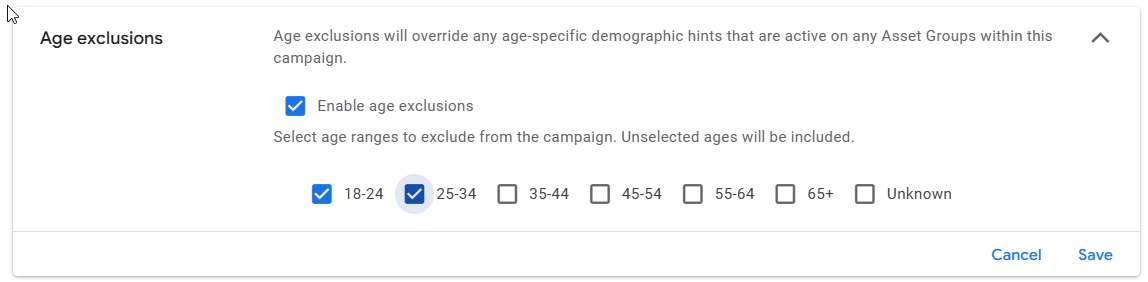
Now you can easily put a stop to this in campaign settings. Here’s a video with some more details.
Full P-Max Asset KPIs
In the beginning we had impressions and subjective ratings from Google (low, good, best, not enough data). But what those ratings are based on has never been clarified by Google. They say performance is relative to other assets, but I’ve seen campaigns with virtually all assets marked as good or poor. Furthermore, is that based on conversion rate, click-through-rate, volume of impressions served, or how many characters long the creative is (I’m being facetious)?
Eventually Google did add conversions KPIs. But without an understanding of cost per conversion or ROAS that’s not really enough to make informed optimizations.
Fortunately Google is in the process of rolling out full KPI reporting for assets. This includes impressions, clicks, CTR, conversions, conversion rate, CPA, ROAS, and more. Armed with these details we can finally properly optimize creative elements.
Summary
Regardless of the reasons why Google is offering greater transparency and control in Performance Max (P-Max) campaigns by rolling out several significant new features – this is hugely helpful for advertisers and will help agencies to provide more robust PPC management.
We can only hope that Google will continue unlocking P-Max over time. On the other hand, Google just launched “AI Max” which puts search campaigns into an almost “black box” state. One step forward and two steps back?