Google’s new channel prioritization tool is a big win for folks running P-Max.
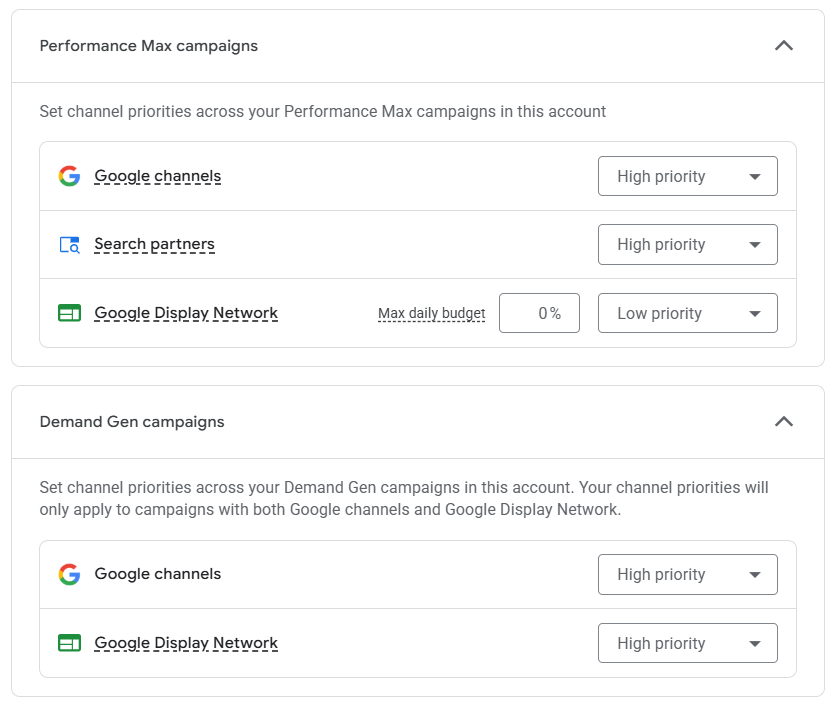
Google pitches the tool as a way to allocate spending across different channels. This, as Google would say, allows advertisers to balance what funnel stages budget is assigned to. But how the vast majority of advertisers will use it is a way to finally turn off the tap on click fraud and otherwise low quality traffic from the display network.
In this article I’ll break down what the tool can do per campaign type and how it’s going to be used in 99% of cases.
Also, be forewarned that this new tool creates a backdoor for Google to reallocate your current ad spend to different channels. Do nothing and you may be sorry!
What is Channel Prioritization?
First, I’m writing this article at the beginning of November, 2026. At this stage, Google has rolled out the tool to about 10% of our client accounts. We expect all clients to have it before the end of the year, if not sooner.
Rather than addressing the main complaint advertisers have about the lack of control in P-Max, Google developed a tool that’s overly complicated with features that are mostly pointless.
The Channel Prioritization tool can be found in both Account and campaign level settings and facilitates setting a percentage of ad spend to different channels on a per campaign-type (account) or campaign basis. It’s broken out into different campaign types which include search, P-Max, shopping, and Demand Gen.
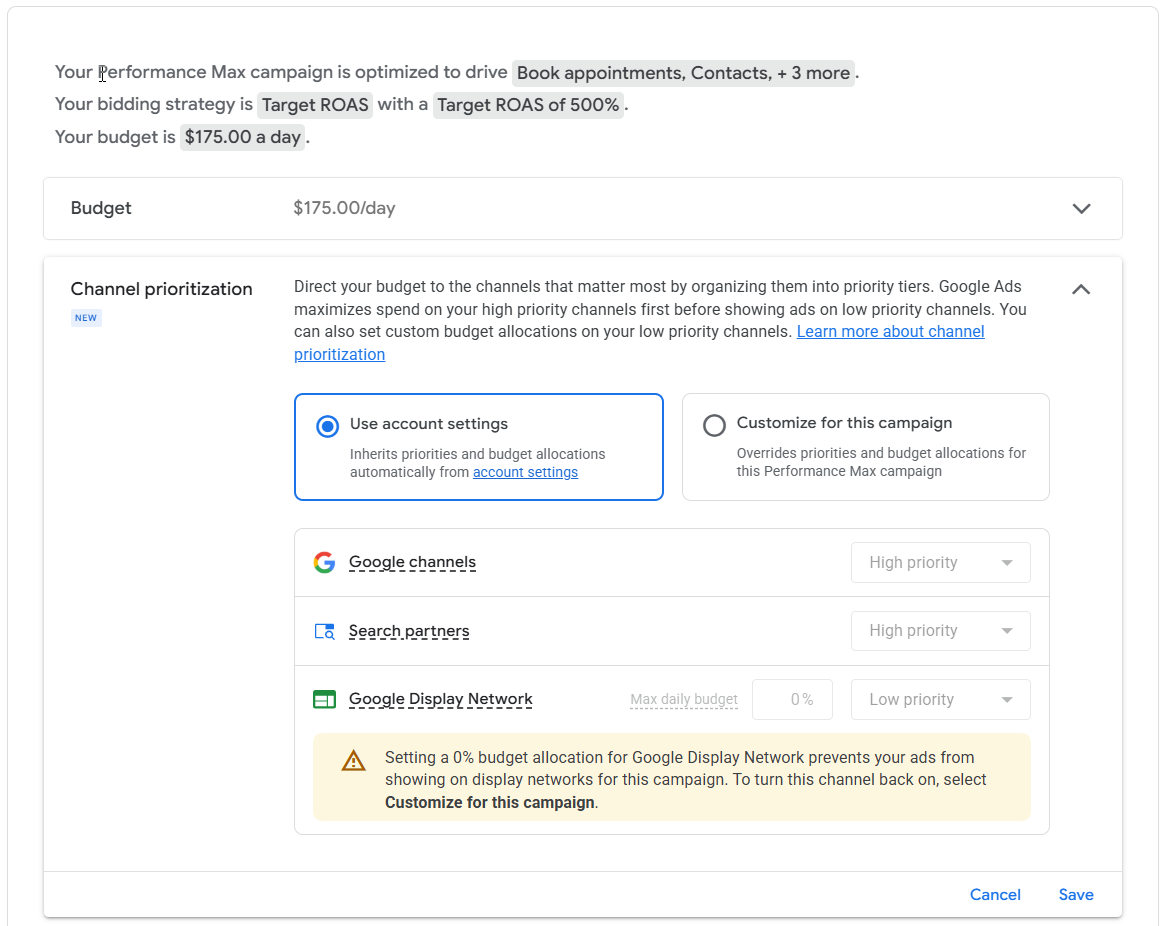
Within each campaign type advertisers can select either a high or low priority per channel. Channels set to a low priority can additionally be adjusted by setting a max percentage of daily budget to apply noting that Google doesn’t guarantee the target will be followed.
In practical terms, Google will “generally” spend budgets on channels with high priority until those are exhausted each day, and then spend on low priority channels.
Next I’ll break down each campaign type.
Search Campaigns
Google offers three channel selections for search which include Google Search, Search Partners, and Google Display Network. For starters, nobody should be running display ads within their search campaigns. The fact that Google still offers this option in 2026 is absurd. If you want to run display ads, do so with a campaign type that properly supports audience and/or contextual targeting along with support for properly formatted display creatives.
Second, I cannot imagine any advertiser prioritizing Search Partners over Google Search. While Search Partners can, sometimes, deliver leads or sales at a similar return to Google Search, that’s exceptionally rate, and/or lead quality is often subpar by a good margin.
The bottom line is there is absolutely no need for a channel prioritization tool for search campaigns. Advertisers should, for the most part, just disable Search Partners and the Google Display Network.
Now a warning, so pay close attention. If you are currently running Search Partners or GDN in your search campaigns, Google may start spending a lot more of your budget on display ads if you do not set a low priority for it. Don’t say I didn’t warn you.
As such, is this tool a sneaky backdoor for Google to waste budgets of less experienced advertisers? I’ll let you be the judge.
Shopping Campaigns
Google offers two channel selections for standard shopping which include Google Search and Search Partners. As with search campaigns, I cannot imagine why any advertiser would prioritize Search Partners over Google Search. Unless you’re starving for traffic most advertisers should continue to exclude Search Partners.
Performance-Max Campaigns
And now we get to the important part of this article.
Performance-Max offers three channel options which include Google channels, Search partners, and Google Display Network. Importantly, Google has integrated search, shopping, and discovery (Gmail, Newsfeed, Maps, and YouTube) into one single channel.
This set up is far from ideal as advertisers would strongly prefer to have specific controls to only run on shopping and/or search. But I suppose what we’ve got is much better than nothing.
Here are some practical thoughts about how and when this tool is useful.
First, I want to get my thoughts about upper funnel advertising out of the way. I am a proponent of upper funnel ads for any advertisers that can affordably and efficiently reach their target audience. Upper funnel ads do absolutely drive more performance through lower funnel channels including paid search, organic search, and especially through branded search. And by “performance” I don’t just mean volume, I mean higher click-through and conversion rates on all search traffic.
The unfortunate truth is that proving this is difficult. While Google offers brand-lift measurement tools, the ad spend required to use them puts those tools out of reach for all but large budget advertisers. So we’re kind of stuck simply measuring an increase or decrease in branded search volume, clicks, and conversions. Not great, but better than nothing.
With that out of the way there are situations when advertisers should be shuttering upper funnel traffic in P-Max.
Bad leads and/or click fraud
Many lead gen advertisers suffer from low lead quality or rampant click fraud that generally originates from the display network and/or video placements. Up until now advertisers could (a) set aggressive account level content suitability settings and (b) periodically exclude any/all placements generating impressions. This will quell the flow of bad clicks and leads to help clean up and improve campaign performance.
For those that are curious here’s how I define aggressive content suitability settings:
- Set inventory type to Limited
- Exclude all or most irrelevant sensitive content categories
- Exclude irrelevant types and labels
- Exclude irrelevant content themes (note that killing “Content suitable for families” can fix problems with runaway kids videos impressions/clicks)
- Exclude content keywords that are irrelevant
- Exclude placements as in (b) above but cutting all mobile app categories can clean up a lot of bad clicks
With the new channel prioritization controls I recommend also “disabling” the GDN and Search partners channels by setting the priority to low and the percentage of max ad spend to 0%.
While you may still get some traffic from YouTube, it can be well managed using the suitability settings and placement exclusions above. And of course you’ll still get some clicks from Gmail and Newsfeed Ads, it’s usually not a lot and those channels are typically free of click fraud.
In fact, at my agency when we use aggressive content suitability settings as above, we typically only see around a few % of ad spend going towards non-search channels.
“Naked” P-Max shopping campaigns
If you’re currently running or are considering running naked P-Max to eliminate non-shopping traffic you should go ahead and set Search Partners and GDN channels to 0%. While “Naked” P-Max campaigns do exclude most of non-shopping spend, it’s never none as Google leaks some traffic through dynamic remarketing on display, search adjacent placements, search placements via URL expansion (when turned on), and automatically generated video ads.
Disabling display and Search Partners may knock your ~2-3% of unwanted non-shopping traffic down another 1-2%.
I will point out again, at this point, that I’m generally not a fan of “Naked” P-Max and would only use it if an account is clearly being attacked with click fraud. Otherwise if it’s simply a matter of not wanting the other channels I’d just run standard shopping.
You run lead gen and just don’t want to spend on upper funnel ads
If you’re in this camp you can use the same settings above to greatly restrict spending in the upper funnel channels. But honestly, if this is your belief system you should just not be running P-Max in the first place. Keep your investment squarely in search ads. Experiment with AI Max if you’re looking to find incremental traffic, keywords, and conversions.
You run lead gen and want greater control over upper funnel ads
In this scenario I would simply move away from P-Max altogether. Run your upper funnel ads through Demand Gen where you have much greater control over what channels you run on and what audiences you target. We’ve moved quite a few of our clients from a Search/P-Max over to a Search/DG strategy over the past year. With much greater control and transparency there’s no going back. Just be aware that CPAs for Demand Gen may be super high. Remember that the main job of upper funnel ads is NOT conversions, it’s to drive brand awareness and influence decision making.
Demand Gen Campaigns
Google offers two channel selections for Demand Gen which include Google channels and the GDN. Unlike P-Max, in this case Google channels only involve the Discovery Network (Gmail, YouTube, Maps, and Newsfeed) which is important distinction. Also, I’ll point out that advertisers can already individually choose which of these four different channels to advertise on. Furthermore, advertisers can choose to run display and/or video ads.
It’s kind of surprising to me that Google is offering channel prioritization for Demand Gen. I guess the one use case I can see is if users want to run on multiple channels with different spending on each. Prior to channel prioritization, you’d have to run separate campaigns for each of the channels.
As for my agency, we really don’t run ads on the GDN anymore. This policy is even more relevant for DG, where there is literally no placements control outside of account level content suitability or placements exclusions lists. GDN isn’t brand friendly and unless you are using offline conversions exclusively, tends to generate a lot of low or no value conversions that lower rather than raise performance.
That aside, if you wish to run GDN, being able to dial the spend up or down on it has some value.
Summary
Google’s new Channel Prioritization offers relief for P-Max advertisers that suffer from poor traffic and/or lead quality. It can also be useful for “Naked” P-Max campaigns and for controlling spend per channel in integrated Demand Gen campaigns.
Advertisers should not ignore this upgrade if they run display or search partners in search campaigns as those default channel priority rules have changed. Also, with so many advertisers likely to shut off channels like GDN, those that don’t might see an increase in spending as Google tries to sell that unwanted inventory.
The bottom line is that this update requires thoughtfulness and monitoring to ensure a smooth transition.